ComparePitch
Scene vs Pitch
Pitch is a design editor for decks you present. Scene writes the deck, narrates it and sends it as one link.
 0:13 / 0:47
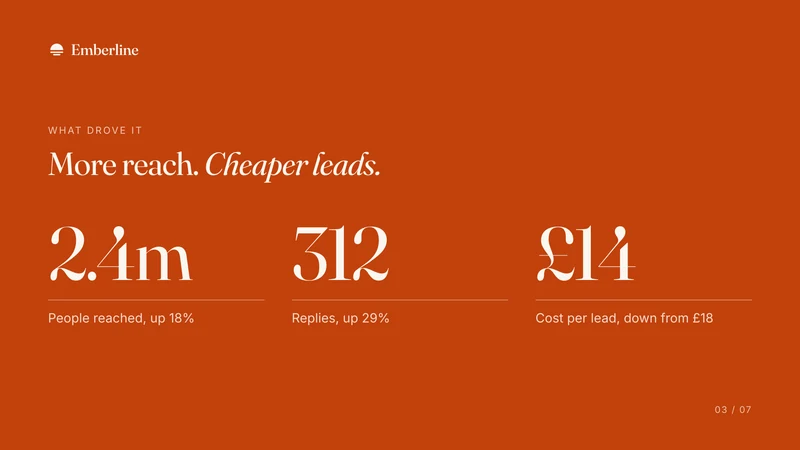
And it wasn’t just more people. Replies rose to three hundred and twelve.
Used by teams at





Side by side.
Pitch is a deck editor for teams, with real-time co-editing.
| Scene | Pitch | |
|---|---|---|
| What the other person gets | One link that plays the deck with its narration, on any device, with no login | A link to the deck, or an exported file |
| Narration | Written to be heard, and narrated slide by slide | You can record video clips onto slides |
| Listener analytics | Every visit: how far it was heard, the slide it stopped on, and whether they booked or replied. No email gate, so it opens on any phone it is forwarded to, and visits are not named | Visits, slide views and time per slide, on Team and Business |
| Book or reply | Book a time or reply, from any slide | Not built in |
| Your own voice | Yes, trained once from a short recording (Pro) | Your own recording |
| Help with the story | Asks what the story needs, and flags anything it added for you to check | AI generation from a prompt |
| Your brand | A brand kit taken from your website | Custom fonts and templates |
| Listen or read | Both: listen, or read it as a page | Read only |
| Work as a team | A shared workspace for the team's decks | Yes |
| How it is priced | First Scene free. Then $25 for 500 credits, or Pro at $49 a month. Per workspace, no seats | Per seat. Free plan |
Checked against Pitch's own pages: Pitch pricing. Plans change: if something here is out of date, tell us and we will fix it.
Which to pick, by what matters.
Where each one is the better choice, and why.
- Live editingPitchReal-time co-editing, slide by slide, with comments.
- Design controlPitchA strong editor, custom fonts and templates.
- FilesPitchPDF and PowerPoint export.
- Narrated for youSceneNo clips to record. Scene writes the narration and says it in a studio voice or your own.
- Written with youSceneScene asks what the story needs, then flags anything it added so you can check it.
- Replies come backSceneThe listener can book a time or reply from any slide, and you see it beside the visit.
- Heard, slide by slideSceneSee how far each visit listened and where it stopped.
Or use both.
Most teams keep Pitch. Scene takes the deck that goes out ahead of you.
decks you design and present live
the ones that go ahead of you
Questions.
Is Scene a Pitch alternative?
For a deck you send ahead, yes. Choose Scene if you want the deck narrated and sent, with replies and bookings coming back. Choose Pitch if you want fine design control and will present it yourself.
How is Scene priced, next to Pitch?
Your first Scene is free. Then $25 for 500 credits, or Pro at $49 a month, billed per workspace with no seats. Pitch: Per seat. Free plan.
Can I see how far they listened?
Yes. Scene shows every visit: how far it was heard, the slide it stopped on, and whether they booked or replied. Pitch: Visits, slide views and time per slide, on Team and Business.
Can I use Scene alongside Pitch?
Yes. Keep Pitch for decks you design and present live, and send the ones that go ahead of you as a Scene. Scene starts from a PowerPoint, PDF or Word file, so nothing has to be rebuilt.
Does the other person need an account?
No. One link plays on any device, with no login. They can listen, or read it as a page.
Can I start from the deck I already have?
Yes. Scene starts from a PowerPoint, PDF or Word file, your notes or a link, and shapes the story with you.
Scene compared with
Hear one before you choose.
A short Scene, made in Scene. Your first is free.