ComparePowerPoint
Scene vs PowerPoint
PowerPoint is for presenting live. Scene is for the deck you send ahead.
 0:13 / 0:47
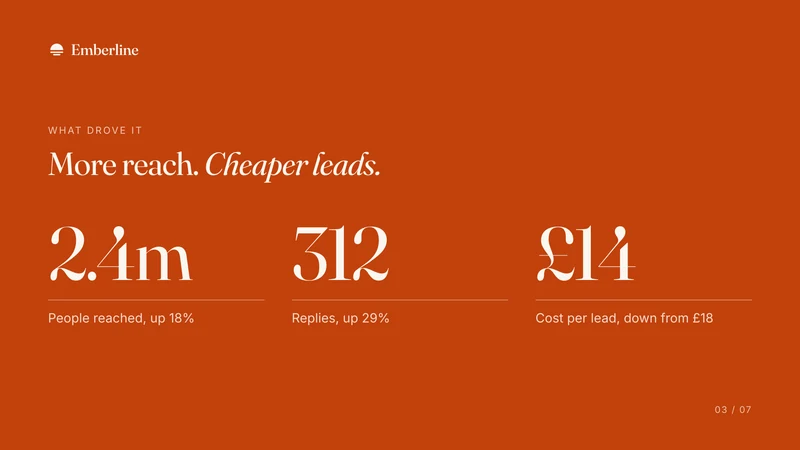
And it wasn’t just more people. Replies rose to three hundred and twelve.
Used by teams at





Side by side.
PowerPoint is the standard deck tool, with Copilot in Microsoft 365.
| Scene | PowerPoint | |
|---|---|---|
| What the other person gets | One link that plays the deck with its narration, on any device, with no login | A file, or a OneDrive or SharePoint link |
| Narration | Written to be heard, and narrated slide by slide | You record it yourself. Copilot can write speaker notes |
| Listener analytics | Every visit: how far it was heard, the slide it stopped on, and whether they booked or replied. No email gate, so it opens on any phone it is forwarded to, and visits are not named | File activity in SharePoint |
| Book or reply | Book a time or reply, from any slide | Not built in |
| Your own voice | Yes, trained once from a short recording (Pro) | Your own recording |
| Help with the story | Asks what the story needs, and flags anything it added for you to check | Copilot drafts slides from a prompt or a file |
| Your brand | A brand kit taken from your website | Your organisation's templates |
| Listen or read | Both: listen, or read it as a page | Open the file |
| Work as a team | A shared workspace for the team's decks | Yes |
| How it is priced | First Scene free. Then $25 for 500 credits, or Pro at $49 a month. Per workspace, no seats | Per user, with Microsoft 365. Copilot is extra on business plans |
Checked against PowerPoint's own pages: Microsoft PowerPoint. Plans change: if something here is out of date, tell us and we will fix it.
Which to pick, by what matters.
Where each one is the better choice, and why.
- The formatPowerPointEveryone can open a .pptx.
- EditingPowerPointEvery detail is yours to change, together, live.
- Already therePowerPointLicensed, approved by IT, and works offline.
- Nobody presents itSceneScene writes the narration and says it, so the deck explains itself.
- One link, any phoneSceneIt opens from one link on any phone, with no file or login.
- Booking inside the deckSceneBook a time or reply from any slide, without leaving the deck.
- Listener analyticsSceneHow far each visit was heard and the slide it stopped on. SharePoint shows that the file was opened.
Or use both.
Most teams keep PowerPoint. Scene takes the deck that goes out ahead of you.
the meeting itself
the same deck, narrated, for everyone who was not there
Questions.
Is Scene a PowerPoint alternative?
For a deck you send ahead, yes. Choose Scene if it is sent ahead and has to make its case on its own, and you want to know how far it was heard. Choose PowerPoint if you will present it live, or the people you send it to expect a .pptx.
How is Scene priced, next to PowerPoint?
Your first Scene is free. Then $25 for 500 credits, or Pro at $49 a month, billed per workspace with no seats. PowerPoint: Per user, with Microsoft 365. Copilot is extra on business plans.
Can I see how far they listened?
Yes. Scene shows every visit: how far it was heard, the slide it stopped on, and whether they booked or replied. PowerPoint: File activity in SharePoint.
Can I use Scene alongside PowerPoint?
Yes. Keep PowerPoint for the meeting itself, and send the same deck, narrated, for everyone who was not there as a Scene. Scene starts from a PowerPoint, PDF or Word file, so nothing has to be rebuilt.
Does the other person need an account?
No. One link plays on any device, with no login. They can listen, or read it as a page.
Can I start from the deck I already have?
Yes. Scene starts from a PowerPoint, PDF or Word file, your notes or a link, and shapes the story with you.
Hear one before you choose.
A short Scene, made in Scene. Your first is free.